
Free picture frame visualizer See your art framed on the wall — before you print it.
Upload a photo, try on frames and mats, and preview it mounted on a real wall or as a clean studio cutout — in seconds. A free art placer with no account, no uploads to a server and no watermark.
- Free forever
- No account needed
- Photos never leave your device
Everything you need for an honest preview
No CRM, no exhibitions, no sales pipeline — just the tools for seeing exactly how a piece will look, framed and hung.
Studio cutouts
Get a clean, isolated shot of your framed piece — perfect for a shop listing or portfolio, no wall required.
Realistic wall mockups
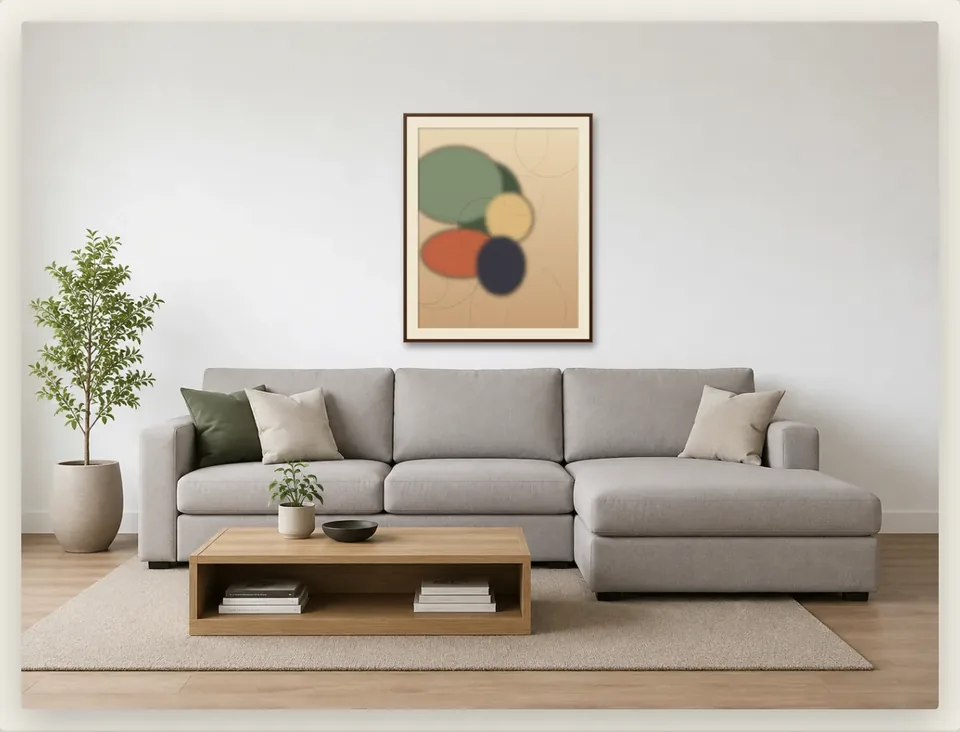
Drop one or several prints onto a photographed room, scaled to their real size, so you know exactly how they'll read on the wall.
Custom mat & frame
Pick a frame wood and colour, then dial in a passe-partout width and colour to match — right down to the detail.
True-to-scale sizing
Enter your print's real dimensions in centimetres or inches. Framed keeps the frame, mat and photo scaled correctly together.
Scenes & templates
Build a whole shoot — several scenes, several prints — once, then save it as a template to reuse with new photos later.
One-click export
Download a single scene as a PNG or JPG, or every scene in the set as one ZIP. No watermark, no login wall.
A free picture frame visualizer for any photo or artwork
Many online frame visualizers only show one shop's frames, or ask you to sign up before you can see anything. Framed works with any photo you have. Try different frames and mats side by side, check how big the print should be, and see it hanging on a real wall.
When it looks right, download the mockup with no watermark. It's free, with no trial and no account.
- Frame finishes. Walnut, black, white, oak, charcoal or gilt — or any custom colour — at whatever frame width you like.
- Mats (passe-partout). Snow, ivory, stone, charcoal or black, at any width. Or skip the mat entirely.
- Real print sizes. Set the width or height in centimetres or inches, from a 10 cm print to a 2 m statement piece.
- Real rooms, or your own wall. Use one of the photographed rooms, or upload a photo of your own wall and mark its corners. Framed matches its perspective.
- Gallery walls. Hang several prints on one wall, each with its own frame and mat, with guides that help you line them up.
- Full-screen editing. Go full screen, tap a print to change its photo, size, mat or frame, and tap the wall to add another.
Three steps, no waiting
Upload your photo
Drag in a photo of your artwork or print. It's decoded and rendered right there in your browser tab — nothing is sent to a server.
Choose a setting
Go with a clean studio cutout, or place it on one of Framed's photographed walls. Then pick your frame and mat.
Download & compare
Export a high-resolution PNG or JPG in one click, or save the whole set as a template you can reuse with your next batch of prints.
A lighter alternative to paid mockup platforms
Tools built for galleries and art businesses — like ArtPlacer — bundle in CRMs, virtual exhibitions, and paid plans after a trial. If all you need is a simple picture placer for an honest preview of art on a wall, Framed does that one job, for free.
| Framed | Typical paid mockup tool | |
|---|---|---|
| Price | Free, forever | Free trial, then a monthly plan |
| Account | Not required | Required |
| Your photos | Stay in your browser | Uploaded to their servers |
| Best for | A quick, honest preview | Running a gallery's marketing & sales |
Questions, answered
Is Framed really free?+
Yes — every feature, no trial period, no credit card. Framed is a small, free tool, not a funnel into a paid plan.
Is there a free picture frame visualizer with no watermark?+
Yes — Framed is a free picture frame visualizer, and every image you download is watermark-free, in PNG or JPG. There's no trial and no paid upgrade to remove anything.
How can I see what a picture frame will look like on my wall?+
Open Framed, upload a photo of your artwork, and choose a frame colour, frame width and mat. Then pick one of the photographed rooms, or upload a photo of your own wall and mark its four corners. Framed places the framed print at its real size, so you can compare frames side by side before you buy or print.
Do I need to create an account?+
No. Open the app and start uploading — there's no sign-up, login, or email required.
Are my photos uploaded to a server?+
No. Framed runs entirely in your browser. Your photos are decoded and composited locally on your device and are never sent anywhere.
What image formats can I upload?+
Any common photo format your browser can display — JPEG, PNG, WebP, HEIC on supported browsers, and more.
Can I put more than one print on a wall?+
Yes. Switch a scene to "On a wall" and add as many prints as you like — each one gets its own size, mat and frame.
Does Framed work on my phone?+
Yes, Framed works in any modern mobile browser, though a larger screen makes fine adjustments easier.
Is there a paid version or a usage limit?+
There's no paid tier. There's a small cap on how many photos you can have in your library at once, to keep the app fast — remove one to add another.
Is Framed the same as ArtPlacer.com?+
No — ArtPlacer is separate software built for galleries and art businesses, with accounts and paid plans (see the comparison above). Framed is a free, unrelated browser tool for a single job: previewing art or photos framed on a wall or as a studio cutout.
Is there a login for Framed?+
No login. Framed opens straight into the tool — there's no account to sign into and nothing to sign up for.
Ready to see it on your wall?
Open the free picture frame visualizer and preview your first print in under a minute — no account needed.